
Pick Calendly for broad, low-friction scheduling across departments. Pick Chili Piper when instant form-to-meeting conversion and territory-based routing are key to moving pipeline. The difference comes down to one question: are you removing calendar friction, or are you converting anonymous inbound intent before the visitor closes the tab?
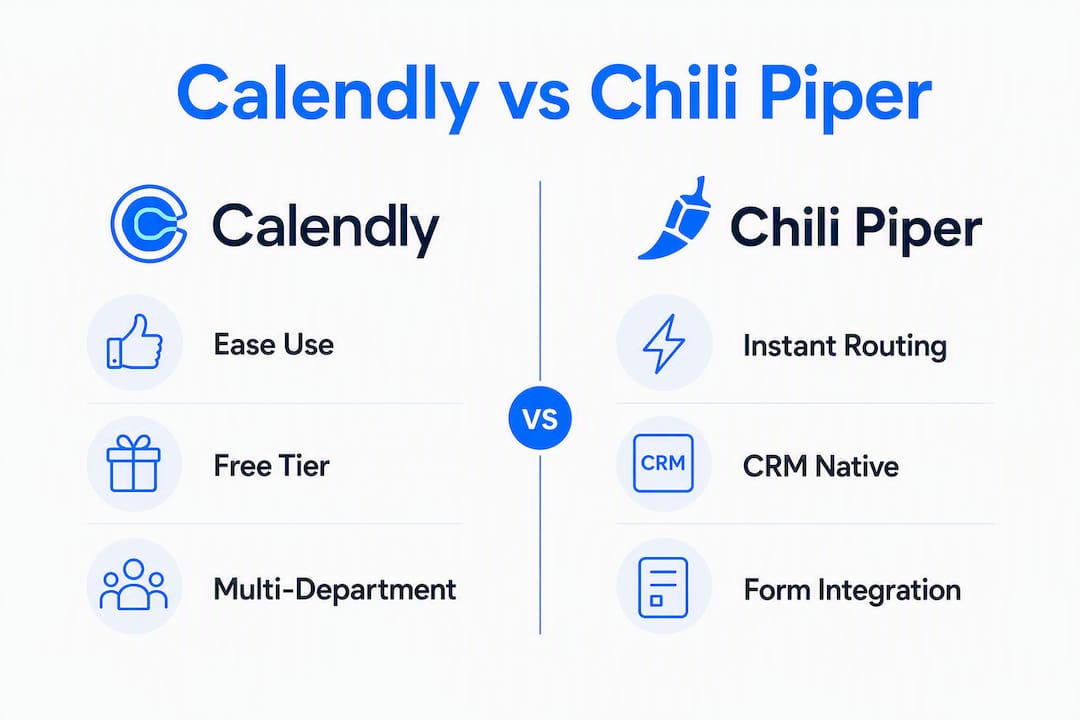
If your team runs Salesforce or HubSpot as the system of record and speed-to-lead is a metric your CRO watches, Chili Piper's CRM-native routing changes what's possible. For everyone else, Calendly's self-serve setup and predictable per-seat pricing cover the job cleanly.
| Scenario | Pick |
|---|---|
| Solo user / freelancer | Calendly (free tier) |
| SMB or small sales team | Calendly Teams (~$16/seat/month) |
| High-volume inbound B2B revenue team | Chili Piper |
- Choose Calendly when your priority is fast, frictionless booking across multiple departments with minimal training.
- Choose Chili Piper when you need real-time lead qualification, territory-based routing, and two-way CRM sync on every inbound form submission.
- Run a proof-of-concept when your inbound demo volume is growing fast and you're unsure whether your RevOps capacity can support a routing platform.
Table of Contents
- How do Calendly and Chili Piper actually differ?
- What features does each tool actually give you?
- Why does form-to-meeting routing change revenue outcomes?
- How deep do the Salesforce, HubSpot, and Zoom integrations go?
- What does each tool actually cost, and what's the real TCO?
- What are the real drawbacks of each tool?
- How do you decide which tool is right for your team?
- What's the final verdict?
- Key Takeaways
- What most teams get wrong about this decision
- The case for a different kind of sales infrastructure support
How do Calendly and Chili Piper actually differ?
Industry analysts frame this as a "job-to-be-done" split: Calendly stops email tag; Chili Piper captures anonymous inbound traffic and converts it before the visitor leaves. That framing holds up in practice.
Calendly is built for broad company use with an emphasis on ease-of-use and self-serve scheduling. Chili Piper is purpose-built for B2B revenue teams that need deep CRM integration and territory-based routing. Neither is a better product in the abstract. They solve different problems.

Pricing shape is where the gap becomes concrete. Calendly offers a free tier and per-seat pricing starting at a modest monthly rate per user. Chili Piper's model includes platform fees plus modules, with practical entry points starting at a significantly higher annual investment. That's not a rounding difference. It's a budget category difference.
Setup time follows the same pattern. Calendly is live in hours, sometimes minutes. Chili Piper requires RevOps configuration: routing rules, CRM field mapping, territory logic, and form integration. Budget days to weeks, not an afternoon.
Four common buyer profiles, mapped quickly:
- Solo user or consultant: Calendly free or Standard. No routing needed.
- SMB sales team (3–15 reps): Calendly Teams handles round-robin and basic routing at a fraction of Chili Piper's cost.
- Mid-market demand gen team: This is where the decision gets real. If inbound form volume is high and you're losing leads to slow follow-up, Chili Piper earns its price.
- Enterprise RevOps: Chili Piper's account-based routing and two-way Salesforce sync are built for this. Calendly's Enterprise tier covers some ground but remains shallower on CRM-native logic.
What features does each tool actually give you?
Chili Piper supports instant form-to-meeting conversion where a lead qualifies and books at the moment of form submission. Calendly focuses on scheduling links typically used after initial contact. That's the core technical difference, and it shapes every other feature comparison.
| Dimension | Calendly | Chili Piper |
|---|---|---|
| Best for | Individuals, SMBs, company-wide scheduling | B2B revenue teams, high-volume inbound |
| Scheduling | Self-serve links, group polls, round-robin | Form-to-meeting instant booking, concierge routing |
| Routing / qualification | Basic round-robin, lookup routing (Teams+) | CRM-native, territory/account-based routing |
| CRM integration depth | Event writes; limited two-way sync | Two-way Salesforce/HubSpot sync, record-level logic |
| Ease of setup | Near-instant, no technical resources needed | Days to weeks; RevOps configuration required |
| Pricing shape | Free tier; ~$16/seat/month | Platform fee + modules; ~$15,000/year entry |
| Scalability | Strong for broad adoption; lighter on CRM depth | Built for enterprise routing complexity |
| Support / SLA | Standard; G2 rates Calendly higher for onboarding | G2 rates Chili Piper higher for integration support |
A few feature notes worth calling out:
- Best for quick one-to-one links: Calendly. No contest. A rep can be live with a personal booking page in under ten minutes.
- Best for instant form-to-meeting: Chili Piper. The form submission triggers qualification logic and routes to the right rep before the prospect moves on.
- UX and adoption friction: G2 reviewer patterns show higher praise for Calendly's near-zero training curve. Chili Piper's power comes at a cost: end users need onboarding, and admins need to understand routing logic before the tool does what it promises.
Calendly has expanded routing and lookup features into its higher tiers, which covers many mid-market routing needs. But "routing" in Calendly's context means basic round-robin and lookup rules. It's not the same as a CRM-native engine that reads account ownership, territory fields, and contact history in real time.
Why does form-to-meeting routing change revenue outcomes?
The mechanics matter here. When a prospect fills out a demo request form, three things need to happen fast: qualify the lead, identify the right rep based on territory or account ownership, and get a meeting on the calendar before the prospect's attention moves elsewhere. Traditional scheduling tools handle step three only, after a human has done steps one and two manually.
Chili Piper collapses all three into a single moment. The form submission triggers a qualification check against your CRM data, routes to the correct rep based on Salesforce territory fields or HubSpot contact ownership, and presents a live calendar for immediate booking. No follow-up email. No SDR manually checking account ownership. No 24-hour lag.
Why does reading account ownership in Salesforce change routing behavior? Because basic round-robin ignores existing relationships. If a prospect from an account already owned by a specific AE hits a round-robin queue, they might get routed to a different rep entirely. That's a broken handoff. CRM-native routing prevents it by querying the record before assigning the meeting.
The practical break-even for a routing platform combines inbound demo requests per month, average deal value, and conversion delta. A useful way to model it: estimate how many inbound meetings per month are currently delayed or lost to slow follow-up, multiply by your average win rate, and multiply again by average deal value. If that number approaches or exceeds $15,000 annually, Chili Piper's entry price starts to make sense.
Pro Tip: Before evaluating Chili Piper, pull three months of inbound form data and calculate your current form-to-meeting conversion rate. If it's below 30% and your average deal value is above $20,000, the ROI case is worth building. If you're converting above 50% with manual follow-up, Calendly Teams may be all you need.
How deep do the Salesforce, HubSpot, and Zoom integrations go?
"Integration" means different things depending on the tool. Calendly writes calendar events and can log activity to Salesforce or HubSpot, but the sync is primarily one-directional: a meeting gets booked, an event gets created. Contact ownership, territory fields, and meeting lifecycle data don't flow back to update CRM records in real time.
Chili Piper's integration with Salesforce and HubSpot is two-way at the record level. When a meeting is booked, routed, rescheduled, or canceled, those events update the CRM contact, opportunity, and activity records. That means pipeline data stays current without manual entry, and handoff quality improves because the next rep in the sequence sees accurate ownership data.

For HubSpot users specifically, Chili Piper's form integration means that a HubSpot form submission can trigger routing logic immediately, using contact lifecycle stage and lead score as qualification inputs. Calendly's HubSpot integration supports activity logging and contact creation, but the routing intelligence lives outside the CRM.
Zoom sits at the end of both workflows. Both tools generate Zoom meeting links automatically on booking, and both support waiting-room controls and recording. The difference is upstream: Chili Piper determines who gets the Zoom link based on CRM logic; Calendly determines when based on availability.
A quick compatibility checklist to run during demos:
- Does the tool write back to the CRM contact record, or only to the calendar?
- Can routing rules query account ownership and territory fields in real time?
- Does a rescheduled or canceled meeting update the CRM opportunity stage?
- Is the Zoom link generated before or after routing assignment?
- What happens when a lead matches no routing rule?
For teams using B2B intent data to prioritize accounts, the answer to that second question determines whether your routing engine is actually account-based or just round-robin with extra steps.
What does each tool actually cost, and what's the real TCO?
Pricing gap in plain numbers: Calendly Teams runs approximately $16/seat/month billed annually. Chili Piper's practical entry point is roughly $15,000/year before implementation labor. For a 10-rep team, that's roughly $1,920/year versus $15,000+, before anyone touches a routing rule.
Calendly's cost structure is predictable. You pay per seat, you get a free tier for solo users, and the Teams plan covers most mid-market scheduling needs. No surprises at renewal unless you add seats.
Chili Piper's pricing model includes a platform fee plus bundled modules. Teams should budget not only seat costs but also RevOps implementation time and ongoing rule maintenance. That last item is the one most buyers underestimate. Routing rules need to be updated when territories change, when reps join or leave, and when CRM field logic shifts. That's a recurring operational cost, not a one-time setup fee.
Total cost of ownership checklist:
- Platform fees (annual contract vs monthly)
- Per-seat costs across all users
- RevOps setup labor (hours × internal rate or agency cost)
- Ongoing routing rule maintenance (estimate quarterly reviews minimum)
- Training and change management for end users
- Integration testing time with Salesforce, HubSpot, or Zoom
Calendly's simplicity makes it the smarter initial spend for most mid-market teams. Chili Piper's premium routing only returns positive ROI when inbound demo volume is high and RevOps capacity exists to support it. That's not a knock on Chili Piper. It's a scope statement.
What are the real drawbacks of each tool?
Neither product is without friction. Knowing where each one breaks down is more useful than a feature checklist.
Calendly pitfalls:
- Teams sometimes assume Calendly's routing features are equivalent to a CRM-native routing engine. They're not. Basic round-robin and lookup routing cover a lot of ground, but they don't read account ownership or territory fields in real time.
- Form-based conversion is not a native Calendly workflow. If your primary use case is converting inbound demo requests at form submission, Calendly requires workarounds that add friction.
- The free tier is genuinely useful for individuals, but enterprise admin controls, SSO, and advanced reporting require the higher tiers.
Chili Piper pitfalls:
- RevOps-grade configuration is required to operate at full depth, and ongoing maintenance of routing logic is a recurring operational cost. Teams that underestimate this end up with routing rules that drift out of sync with CRM data.
- Platform-fee variability can make budgeting difficult. The entry price is roughly $15,000/year, but module add-ons and seat expansion can push that number significantly higher.
- Setup complexity is real. A Chili Piper deployment without dedicated RevOps involvement often produces a tool that routes incorrectly or inconsistently, which is worse than no routing at all.
Red flags to watch for during demos:
- No live demonstration of two-way CRM sync updating a contact record
- Routing logic shown only in a sandbox, not against real CRM data
- Unclear billing structure when lead volume scales
- Support SLA not specified in the contract
- No clear answer on what happens when a lead matches no routing rule
On support: G2 trends show Chili Piper rated higher for integration depth and support responsiveness, while Calendly scores higher for ease of setup and onboarding. If your team needs hand-holding through a complex CRM integration, Chili Piper's support model is better suited. If you need a tool that works without support, Calendly wins.
How do you decide which tool is right for your team?
Start with operational questions before you open a demo. The answers will tell you which product you're actually evaluating.
Operational questions to answer first:
- What is your current inbound demo request volume per month?
- Is Salesforce or HubSpot your system of record for account ownership?
- Who in your organization will own routing rules and maintain them?
- What is your average deal value, and what is your current form-to-meeting conversion rate?
- Do you have dedicated RevOps capacity, or will this fall to a sales manager?
If inbound volume is comparatively low and your average deal value is moderate, Calendly Teams almost certainly covers your needs at a fraction of the cost. At low inbound demo volumes, Calendly Teams often provides sufficient routing at an economical price. Chili Piper typically earns its price with high inbound volume and dedicated routing rules.
Pilot design for a 30-day evaluation:
For Calendly: set up round-robin routing for your top five inbound use cases, connect to HubSpot or Salesforce, and measure booked vs. held rate and rep assignment accuracy over 30 days.
For Chili Piper: run a focused Concierge trial on a single high-traffic form with one territory's routing logic. Measure form-to-meeting conversion rate, routing accuracy (lead matched to correct owner), and speed-to-lead against your current baseline.
Scoring framework: weight speed-to-lead and routing accuracy most heavily if pipeline conversion is the goal. Weight adoption friction and setup cost most heavily if company-wide scheduling is the goal. Total cost of ownership and scalability matter more at 50+ seats.
Demo questions worth asking each vendor:
- Show me a live routing rule that reads account ownership from Salesforce and routes accordingly.
- What happens when a lead matches no rule?
- How does a territory change propagate through existing routing logic?
- What is the SLA for support tickets related to routing failures?
- Can you show the CRM contact record after a meeting is booked, rescheduled, and canceled?
For teams building account-based marketing workflows, the routing accuracy question is especially critical. A routing engine that ignores account ownership undermines the entire ABM motion.
What's the final verdict?
The right answer depends on what problem you're actually solving.
Choose Calendly if:
- You need fast, low-friction scheduling across multiple departments or functions.
- Your team is under 20 reps and inbound demo volume is manageable with manual follow-up.
- Budget is a constraint and you need a tool live this week.
- You want a free tier for individual contributors and a predictable per-seat cost as you grow.
Choose Chili Piper if:
- Inbound demo conversion is a primary revenue lever and speed-to-lead is tracked at the executive level.
- You run Salesforce or HubSpot as your system of record and need territory-based or account-based routing.
- You have dedicated RevOps capacity to configure and maintain routing rules.
- Your average deal value justifies a $15,000+ annual platform investment.
Run a POC first if:
- Your inbound volume is growing fast but you haven't modeled the ROI yet.
- You're unsure whether your CRM data quality is clean enough to support reliable routing.
- Your RevOps team is stretched and you need to validate implementation effort before committing.
Governance matters as much as the tool choice. Whoever owns routing rules must have CRM admin access, understand territory logic, and have a process for updating rules when reps change. Without that ownership, even the best routing platform produces incorrect assignments within 90 days.
Suggested next steps: run a 30-day Calendly Teams pilot if you're in the SMB or mid-market range. If you're evaluating Chili Piper, start with a single form and one territory's routing logic before expanding. Measure form-to-meeting conversion rate, routing accuracy, and speed-to-lead as your three primary metrics.
Key Takeaways
Calendly wins on simplicity and cost for most teams; Chili Piper wins on CRM-native routing and form-to-meeting conversion for high-volume B2B revenue teams with dedicated RevOps capacity.
| Point | Details |
|---|---|
| Core positioning split | Calendly handles broad scheduling; Chili Piper converts inbound intent into booked meetings at form submission. |
| Pricing gap is significant | Calendly Teams runs ~$16/seat/month; Chili Piper's practical entry is ~$15,000/year before implementation labor. |
| RevOps capacity is a prerequisite | Chili Piper requires ongoing routing rule maintenance; without dedicated RevOps, routing drifts out of sync. |
| Volume threshold matters | At low inbound demo volumes, Calendly Teams covers most routing needs at a fraction of the cost. |
| Chadburmeister's role | For teams that need hands-on SDR/BDR leadership and AI-powered sales strategy alongside tooling decisions, Chadburmeister offers consulting and executive guidance. |
What most teams get wrong about this decision
The most common mistake is treating this as a features race. Teams read a comparison table, count checkboxes, and conclude that Chili Piper is "more powerful" and therefore better. That logic only holds if the power you're paying for maps to a problem you actually have.
Chili Piper's form-to-meeting routing is genuinely impressive. But it requires clean CRM data, maintained territory logic, and a RevOps owner who treats routing rules as a living system. Most mid-market teams don't have that. They have a sales manager who also handles forecasting, a CRM that's 60% accurate, and a RevOps function that's one person wearing three hats. Dropping a $15,000 routing platform into that environment doesn't fix the conversion problem. It adds a new maintenance burden on top of it.
The teams that get the most out of Chili Piper treat it as infrastructure, not software. They audit CRM data quality before implementation, assign explicit ownership of routing rules, and build a monitoring cadence into their RevOps calendar. That's the difference between a tool that pays for itself and one that gets quietly abandoned after six months.
Calendly's simplicity is underrated in this context. For a 10-rep team with moderate inbound volume, Calendly Teams with basic round-robin routing and a HubSpot integration covers 80% of the use case at 10% of the cost. The remaining 20% is real, but it's only worth paying for when the volume and infrastructure are there to support it.
If you're running SDR and BDR teams and want a sharper take on how AI and tooling choices interact with pipeline outcomes, the AI for Sales Podcast covers exactly this territory with practitioners who've made these calls at scale.
Useful sources for further research
These are the sources used to build this comparison. Each is worth opening if you want to validate a specific claim or go deeper on a particular dimension.
- Calendly vs. Chili Piper: Which One Is Better? (Trafft) — Strong on the job-to-be-done framing and the break-even model for routing platform ROI. Start here if you're building an internal business case.
The case for a different kind of sales infrastructure support
Tools like Calendly and Chili Piper handle the mechanics of booking. What they don't provide is the strategic layer: knowing which routing logic to build, how to structure SDR and BDR handoffs, and how to connect meeting outcomes to pipeline forecasting.
That's where Chadburmeister fits. With 25+ years scaling high-performance sales and business development teams at companies like RingCentral and Cisco-WebEx, Chad Burmeister works directly with CROs, founders, and sales leaders who need more than a software subscription. Whether you're deciding between scheduling tools, building out an SDR team, or figuring out how AI fits into your pipeline motion, the consulting and published playbooks at Chadburmeister give you a practitioner's framework, not a vendor's pitch deck. If you're at the stage where tooling decisions need a strategic owner, that's the conversation worth having.