Sales enablement content is any resource built to help sellers move deals forward and help buyers make confident decisions. It splits into two connected jobs: internal materials that prepare reps (playbooks, battlecards, training) and buyer-facing assets that answer prospect questions (case studies, ROI calculators, one-pagers). This guide covers the full asset list, how to build and organize it, and how to measure whether any of it actually works.
TL;DR:
- Building and updating a unified enablement library requires regular tracking of asset usage and relevance to avoid content obsolescence and stagnation.
- Organizing content with multi-dimensional tags based on deal stage, persona, industry, and use case improves search efficiency and relevance for sellers.
- AI can enhance sales enablement by surfacing relevant content before calls and personalizing assets with account-specific data, but human oversight remains crucial.
- Effective training involves role-playing with real assets, integrating content into daily workflows, and linking certification to actual application in calls.
- Collaborating regularly between sales and marketing, with clear ownership and comprehensive compliance checks, ensures content remains accurate, timely, and actionable.
Table of Contents
- What Counts as Sales Enablement Content: Internal and Buyer-Facing Assets
- How to Create Sales Training Materials Sellers Will Actually Open
- Organizing Content So Sellers Can Actually Find It
- Measuring Whether Your Sales Enablement Content Actually Works
- Mapping Sales Collateral to Buyer Personas and the Buying Committee
- Quick Templates for the Assets You'll Build Most Often
- Getting Sales and Marketing to Actually Agree on Content
- Connecting Content to Your CRM and Sales Stack
- Training Reps to Actually Use What You Build
- Legal and Compliance Checks Before Content Ships
- Where AI Is Actually Changing Sales Enablement Content
- What Sales Leaders Get Wrong About Content Adoption
- Bring In Outside Help to Build Your Enablement Playbook
- Sources
What Counts as Sales Enablement Content: Internal and Buyer-Facing Assets
Most sales teams already have some version of this content. The problem is almost none of it lives in one place, gets updated on a schedule, or gets tracked for usage. Real enablement libraries treat internal and external assets as two connected jobs: one prepares the rep, the other convinces the buyer.
Internal-only assets exist to make reps faster and more consistent. They never reach a prospect's inbox:
- Sales playbooks — step-by-step guidance for specific deal types, verticals, or competitive situations
- Battlecards — one-page competitive breakdowns covering objections, pricing traps, and win themes against a named rival
- Call and demo libraries — recorded examples of strong (and weak) conversations, tagged by scenario
- Training and certification modules — structured onboarding and skill checks tied to product releases or methodology changes
- Scripts and talk tracks — cold outreach, discovery questions, and objection-handling language
- Pricing and discounting guides — internal rules of engagement so reps do not improvise on margin
- Internal FAQs — quick answers to questions reps ask enablement or product teams repeatedly
Buyer-facing assets get shared directly with prospects or stakeholders:
- Case studies — proof a similar company solved a similar problem
- One-pagers and datasheets — compact, scannable summaries of a specific capability or offer
- ROI calculators — interactive or spreadsheet tools that quantify expected return
- Demo videos — short, targeted product walkthroughs a rep can send instead of scheduling a live session
- Mutual action plans — shared timelines that align buyer and seller on next steps and close dates, which double as a trust-building artifact in competitive deals
- Whitepapers — deeper, research-backed arguments for buyers who need to justify a decision internally
Not every asset deserves the same investment. Battlecards and pricing guides are quick wins. You can build a usable version in a day, and reps notice the impact within a week. ROI calculators and executive whitepapers are strategic bets. They take longer to build, need input from finance or product, and pay off over quarters rather than days. Sort your roadmap by that distinction before you sort by anything else.
How to Create Sales Training Materials Sellers Will Actually Open
Most content libraries fail for a boring reason: nobody asked sellers what they needed before building it. A repeatable process fixes that.
- Audit what exists and what's missing. Pull usage data from your content platform, or if you don't have one, just ask ten reps what they searched for last month and didn't find. Cross-reference against deals lost to "no decision" or a named competitor. That gap is your priority list.
- Map assets to the buyer journey. Gartner's B2B buying research frames content as something that has to match a specific stage and a specific stakeholder, not a generic "sales collateral" bucket. A CFO evaluating cost has different questions at stage three than a technical champion evaluating fit at stage one. Build a simple grid: journey stage down one side, stakeholder role across the top, existing (or missing) assets in each cell.
- Create with a template and an owner. Every asset needs a named owner, a review checklist, and acceptance criteria before it ships. A battlecard without a competitive intelligence sign-off is a guess dressed up as guidance.
- Pilot with five to ten reps before a full rollout. Get feedback on whether the asset actually gets used in a live call, not just whether it looks good in a review meeting. Version it, log the changes, and only then push it to the whole team.
Pro Tip: Build your acceptance checklist before you build the asset, not after. If you can't answer "who approves this" and "how will we know it's working" up front, the content sits in a folder and never gets used.
Organizing Content So Sellers Can Actually Find It
A content library organized around product lines makes sense to marketing and almost nobody else. Sellers don't think in product SKUs mid call. They think in objections, industries, and deal stages. A seller-centric taxonomy, built around how reps actually search rather than how the org chart is drawn, fixes that mismatch at the root.
Tagging matters more than folder structure. A single asset should carry multiple tags at once:
- Deal stage (discovery, evaluation, negotiation)
- Persona (economic buyer, technical evaluator, end user)
- Industry (healthcare, financial services, manufacturing)
- Use case (migration, expansion, competitive displacement)
That multi-dimensional tagging is what lets a rep search "healthcare, negotiation, competitive" and get three relevant results instead of scrolling through forty.
Platform choice matters less than integration. A content library, a CRM, and an enablement platform that don't talk to each other force reps to hunt across three systems mid deal. Research from Harvard Business Review found that switching between disconnected applications drains meaningful time and focus over a workday, and that cost compounds every time a rep has to leave their CRM to find a battlecard.
The better model is proactive delivery. Instead of making reps search, surface the right asset before they need it. AI-generated pre-meeting briefings that pull account history, recent news, and the three most relevant assets into a single pack are becoming standard in more mature revenue teams. Calendar-aware recommendations that flag "this call is with a healthcare CFO, here's the ROI calculator and the two closest case studies" cut search time to near zero.
Measuring Whether Your Sales Enablement Content Actually Works
Most teams track how many assets exist. That's the wrong number. Track whether reps use them and whether usage correlates with winning.
Five metrics matter more than a content count:
- Content usage rate — what percentage of live opportunities touch at least one enablement asset
- Time-to-first-response — how fast a rep can answer a buyer question with a relevant asset instead of "let me get back to you"
- Win-rate lift — win rate on deals that used a specific asset versus deals that didn't
- Deal velocity — whether asset use correlates with a shorter sales cycle
- Adoption rate — the share of reps actively using the library versus ignoring it
Review cadence should match how fast an asset goes stale. Battlecards need a monthly look, since competitive positioning shifts fast. Case studies and ROI calculators can run on a quarterly cycle. Pricing guides need review the moment pricing changes, full stop, no calendar involved.
The market itself backs up why this measurement discipline matters now more than it used to. Spending and attention on this category grew at an estimated 17.4% compound annual rate between 2019 and 2026, which means more content is getting built industry-wide, and more of it is competing for the same finite seller attention. Volume without a measurement layer just adds noise.
Run experiments before committing budget. Give one asset to half your team for a month, withhold it from the other half, and compare win rates on comparable deals. It's not a controlled trial, but it's far better evidence than a hunch that "reps probably like this."
Mapping Sales Collateral to Buyer Personas and the Buying Committee
A single case study cannot do the job of convincing a CFO, a CTO, and a procurement lead at the same time. Each stakeholder on a buying committee carries a different risk they're personally trying to avoid, and content built around that specific concern closes faster than generic collateral aimed at "the buyer" as a single entity.
| Buying committee role | Primary concern | Best asset type | Typical channel |
|---|---|---|---|
| CEO / executive sponsor | Strategic fit, competitive advantage | Executive brief, one-page vision summary | In-person or exec-to-exec email |
| CFO | Cost, ROI, budget justification | ROI calculator, financial case study | Shared document, follow-up email |
| CTO / technical evaluator | Integration, scalability, security | Technical whitepaper, architecture diagram | Demo, technical deep-dive call |
| Champion (internal advocate) | Looking good internally, low personal risk | Internal pitch deck, mutual action plan | Direct collaboration tool |
| Procurement | Terms, pricing structure, vendor risk | Pricing sheet, contract terms summary | Formal proposal document |
| IT / security reviewer | Compliance, data handling, uptime | Security whitepaper, compliance checklist | Secure document portal |
Consensus-building assets do double duty. An executive brief a champion can forward internally, without a rep in the room to explain it, often does more to move a deal than another live demo. That's the real test for whether an asset belongs in your library: can it survive being read alone, three weeks later, by someone who never spoke to your team?
Quick Templates for the Assets You'll Build Most Often
You don't need a design team to ship something usable. A few structural rules cover most assets:
- One-pager: headline problem statement, three proof points, one call to action, logo or quote for credibility.
- Battlecard: competitor name, their pitch in one line, your win themes, three landmines to plant, three traps to avoid.
- Executive ROI summary: current cost of the problem, projected savings, payback period, one comparable customer result.
- Demo snippet: thirty to ninety seconds, one feature, one buyer pain it solves, no narration filler.
Before anything ships, run it against a short checklist:
- Named owner assigned
- Publish date and next review date logged
- Distribution channel specified (email, portal, live call)
- Approval sign-off from the relevant subject matter expert
Framing beats formatting every time. "Here's what our platform does" loses to "here's the specific cost you're carrying right now, and here's what removes it." The 0 to 90 day executive playbook approach applies the same principle to selling into the C-suite: lead with the buyer's stake, not your feature list.
Getting Sales and Marketing to Actually Agree on Content
The oldest complaint in B2B revenue teams is still true: marketing builds content sales never uses, and sales complains there's nothing good to send. The fix isn't a bigger content budget. It's a shared definition of done.
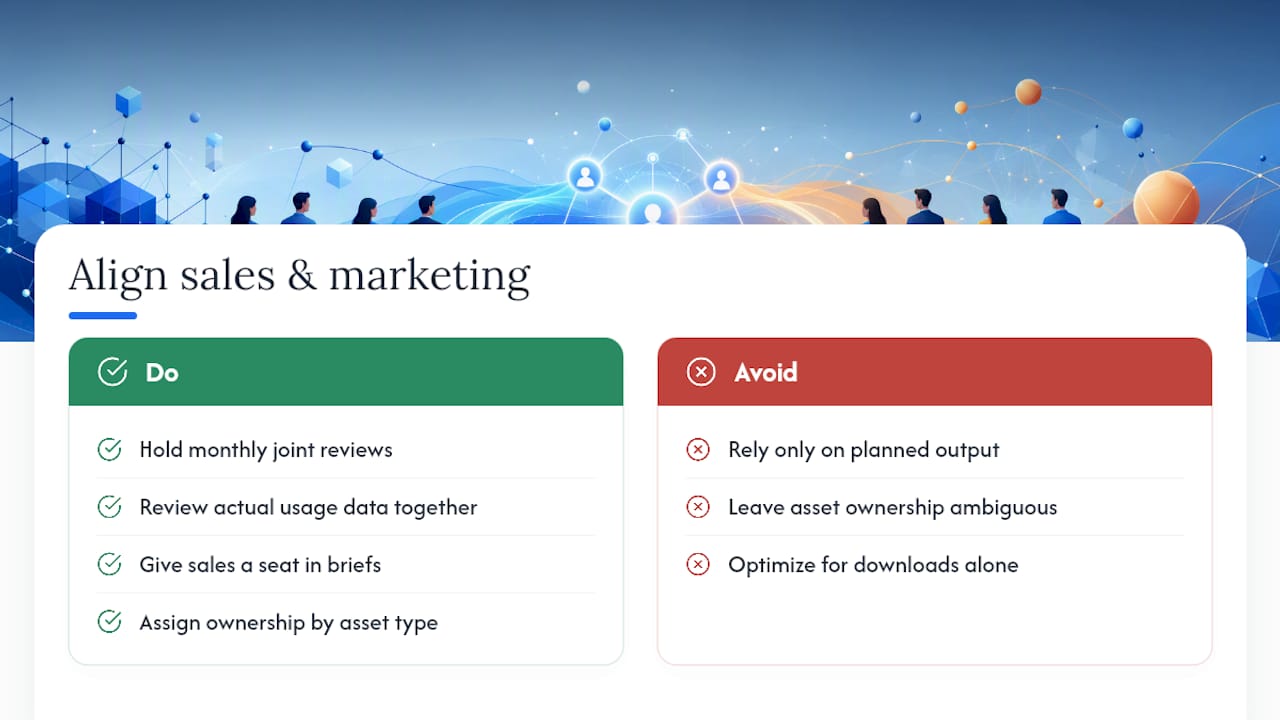
Put a joint review cadence on the calendar, monthly at minimum, where sales and marketing look at usage data together, not just planned output. If a case study marketing spent three weeks building has zero opens in the CRM after sixty days, that's information both teams need, not a failure to hide.
Give sales a real seat in the brief, not just a comment pass at the end. The rep who lost the last three deals to a specific competitor knows more about what a battlecard needs than anyone in a content review meeting. Build that input into the process before the first draft, not after.
Agree on ownership by asset type instead of by department. Marketing typically owns top-of-funnel and brand-facing pieces; sales or enablement typically owns battlecards, pricing guides, and anything tied to an active deal. Ambiguous ownership is why assets go stale. Nobody updates something they don't clearly own.
Finally, close the loop with win-rate data, not just download counts. Marketing optimizing for asset views and sales optimizing for closed deals will always talk past each other unless both sides agree that a shared revenue number is the only score that counts.
Connecting Content to Your CRM and Sales Stack
Content that lives outside the tools reps already use during a call gets ignored, no matter how good it is. The fix is surfacing the right asset inside the CRM record itself, tied to deal stage and account context, rather than making reps leave their workflow to go find it.
At minimum, integration should let a rep see relevant content directly on the opportunity record: the case study for their vertical, the battlecard for the competitor named in the deal, the ROI calculator pre-filled with the account's numbers where possible. Some sales engagement platforms now layer content recommendations directly into the sequence or cadence tool, so the right asset attaches to an email without a separate search.
Call recording and conversation intelligence tools add another layer. Platforms built to capture calls and convert them into usable content, like clip libraries tagged by objection or use case, turn real seller conversations into training material without anyone manually transcribing anything. That closes a loop most libraries miss entirely: the best new battlecard example usually already happened on a call last week, it just never got captured.
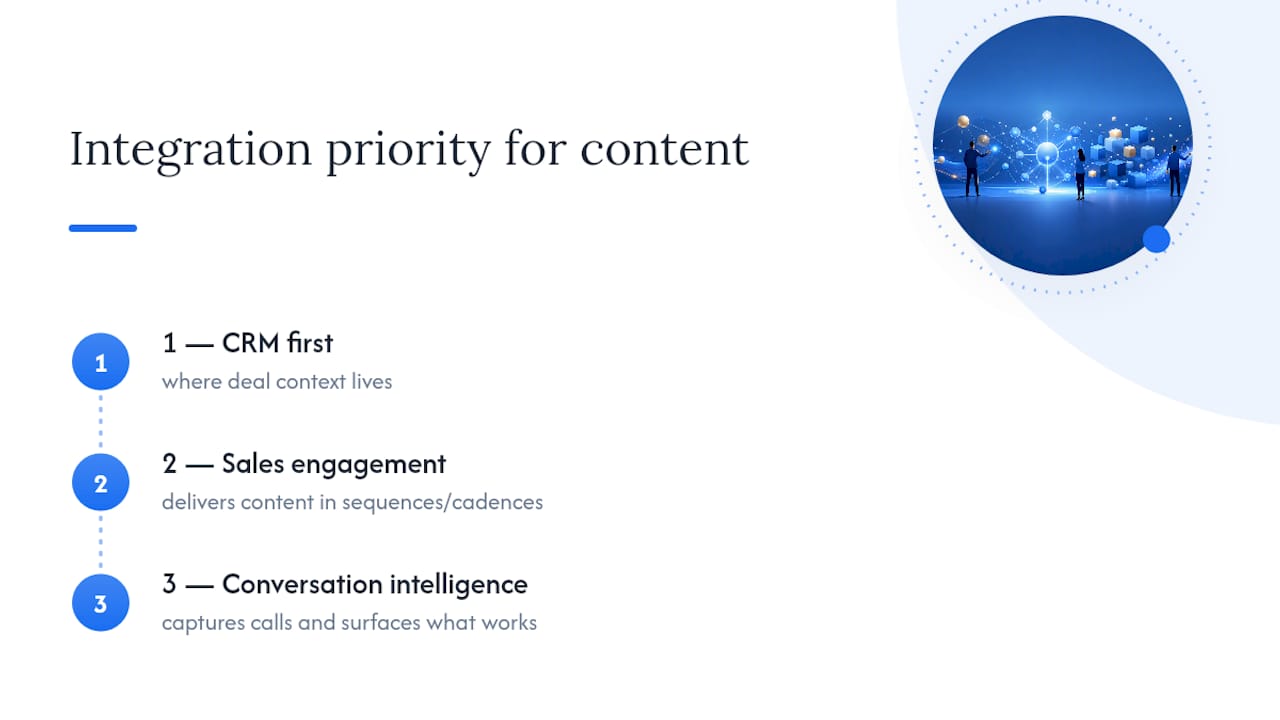
Prioritize integrations in this order: CRM first, since that's where deal context lives; sales engagement or cadence tools second, since that's where outbound content gets sent; conversation intelligence third, since that's where you learn what's actually working. Trying to integrate everything at once usually means nothing gets done well.
Training Reps to Actually Use What You Build
A library nobody was trained on is a library nobody opens. Training on content should be treated the same way you'd treat training on a new CRM field: mandatory, specific, and reinforced past the first week.
Role-play with real assets in hand works better than a slide deck explaining what the asset is for. Have reps practice pulling up the actual battlecard mid roleplay, not just reading it once in a training session. That builds the muscle memory to reach for it live, under pressure, on a real call.
Certification should be tied to usage, not just comprehension. A quiz proving a rep read the pricing guide means little. Proof they applied it correctly on three recorded calls means everything. Tie enablement certification to call review, not a multiple-choice test.
Make new content visible where reps already look. A Slack or Teams announcement that disappears in an hour does nothing. Pin new assets inside the CRM opportunity view, or attach them to the relevant playbook section, so reps encounter them in context rather than needing to remember a training session from three weeks ago.
Legal and Compliance Checks Before Content Ships
Sales content moves fast, which is exactly why it's a common source of compliance exposure. A rep sending an outdated pricing sheet or an unapproved claim about product capability creates real legal risk, not just an awkward correction email.
Every buyer-facing asset needs a compliance pass before it reaches the approved library, particularly around claims of ROI, performance guarantees, or regulatory certifications your product may or may not actually hold. If a whitepaper claims a specific compliance standard, someone with actual authority to verify that claim needs to sign off before it's published, not after a customer asks for proof.
Version control matters here more than almost anywhere else in enablement. When pricing or contract terms change, the old version needs to be pulled from circulation immediately, not just superseded by a newer file sitting next to it in the same folder. A rep who accidentally sends last quarter's pricing sheet has created a real problem, not a minor inconsistency.
Industries with specific regulatory exposure, financial services, healthcare, and government contracting among them, need an extra review layer for any asset referencing data handling, security certifications, or industry-specific claims. Build that review into your publish checklist as a required field, not an optional step someone can skip under deadline pressure.
Where AI Is Actually Changing Sales Enablement Content
AI's most useful role in enablement right now isn't writing the content. It's surfacing the right piece at the right moment. Systems that pull account context and recommend the most relevant assets before a call are cutting search time for reps who used to dig through shared drives looking for the right case study.
Personalization is the second real shift. Instead of one generic one-pager, AI tools can now generate a version pre-populated with a specific account's industry, likely pain points, and relevant proof points pulled from CRM data. That's a meaningful upgrade from a static PDF that every rep sends unchanged.
The guardrail matters as much as the capability. AI-generated content still needs a human check before it reaches a buyer, particularly around factual claims, pricing, and anything that could be read as a commitment. Governance and data quality determine whether AI recommendations are actually useful or just confidently wrong. A recommendation engine built on stale CRM data will surface the wrong asset just as fast as no system at all.
What Sales Leaders Get Wrong About Content Adoption
Most enablement teams over-invest in production and under-invest in coaching. You can build the best battlecard in the industry, but if nobody role-plays it before a live call, it sits unused. Weekly call reviews built around a shared library, not generic feedback, do more for adoption than another content sprint.
AI can auto-generate pre-meeting briefings by pulling account history and surfacing the three most relevant assets before a rep even opens their calendar. That's a real time saver. It is not a replacement for a manager listening to the call afterward and asking why the rep didn't use the asset that was sitting right there.
Start small: one weekly micro-coaching session, one pre-meeting pack delivered automatically, and one clear signal you're tracking, like whether battlecard use correlates with win rate on competitive deals. If that signal ticks up in a quarter, you've found something worth scaling. If it doesn't, you've saved yourself a much bigger investment in a system built on the wrong assumption.
— Chad
Bring In Outside Help to Build Your Enablement Playbook
Most teams reach a point where the internal audit, the content build, and the coaching cadence all need to happen at once, and there's no bandwidth to run all three well. That's the moment to bring in outside leadership rather than stretch an already-full enablement team thinner.
Consultants can work directly with revenue leaders on the pieces this guide covers: building the audit and taxonomy from scratch, writing the playbooks and battlecards reps will actually open, and running the workshops that get a new library adopted instead of ignored. If your team already has bandwidth and just needs a framework, run the internal pilot process outlined above. If you need someone experienced in building these libraries inside sales organizations to lead the build and train your team on it directly, that's a workshop or consulting engagement worth having a conversation about. Visit the Chad Burmeister site to see current speaking, workshop, and consulting options, and reach out through the contact page to talk through what a first ninety days of enablement work would look like for your team.
Sources
- Why the boom in sales enablement content
- Gartner — B2B buying journey
- How much time and energy do we waste toggling between applications? — HBR