Sales automation workflows use software to run repeatable sales steps end to end, so reps stop re-typing notes and chasing tasks and spend more time actually selling. The two automations worth building first are automated follow-up sequences and CRM data updates, since they touch every deal and take the least setup time. Teams that start there typically see faster lead response and fewer deals that quietly go cold.
TL;DR:
- Focusing on automated follow-up sequences and CRM data updates provides the highest leverage for speeding response times and reducing deal drop-off.
- Building workflows around lead enrichment, automatic routing, and meeting scheduling can significantly cut manual tasks and improve deal management.
- Pilots should target high-frequency, low-judgment tasks, run for two to four weeks, and include guardrails like pausing when prospects reply to prevent sloppy automation.
- Use a CRM-centric tool setup, prioritize integrations with calendar and email, and audit automation logic regularly to prevent fragile systems and data errors.
- Measure success through reductions in admin time, response times, and deal cycle length, ensuring reply rates and data quality also improve alongside automation efforts.
Table of Contents
- What Do Sales Automation Workflows Actually Cover?
- What Do Sales Workflow Stages and Automation Examples Look Like?
- How Do You Build Your First Sales Automation Workflow?
- What Should You Look for in Sales Automation Tools?
- How Do You Measure the Impact of Sales Automation?
- What Do Field Playbooks Get Right About Automating Sales?
- What Most Advice Gets Wrong About Sales Automation Workflows
- Want Hands-On Help Building Your First Pilot?
- Sources
- FAQ
What Do Sales Automation Workflows Actually Cover?
A workflow is different from a single automated task. A task automation might auto-send one email when a form is submitted. A workflow chains several of those actions together, using triggers and conditions, so one event sets off a sequence that spans tools: a new lead hits your CRM, gets enriched, gets scored, gets assigned to a rep, and lands in a cadence, all without a human touching a keyboard.
AI has changed what that chain can do. Instead of a rigid "if this, then that" script, modern platforms make decisions from context. Zapier's rundown of sales automation points out that the field is shifting from linear sequences to agentic workflows that read CRM data, email replies, and buyer behavior before deciding what happens next. That means a follow-up email can change its message based on what a prospect actually wrote back, not just whether three days have passed.
That flexibility comes with real limits. AI is good at scoring leads, drafting a first-pass follow-up, and summarizing a call. It is not good at reading nuance in a stalled six-figure deal or deciding whether to walk away from a bad-fit prospect.
Sales automation workflows are strongest when they handle:
- Repetitive data entry and logging
- Time-based or trigger-based outreach
- Scoring and routing based on defined rules
- Drafting content a human reviews before sending
They're weakest when asked to make judgment calls on pricing, negotiation, or relationship repair. Keep a human in the loop for anything with that kind of stakes.
What Do Sales Workflow Stages and Automation Examples Look Like?
A typical sales workflow runs through several stages, and Lindy maps them as lead research, outreach, qualification, demos, proposal, close, and onboarding. Automation can sit inside every one of those stages, but it earns its keep fastest in a few specific spots.
- Lead capture and enrichment. A new inbound lead gets enriched with firmographic data and routed to the right rep automatically, often pulled from a B2B contact database rather than manual research.
- Automated follow-up sequences. A cadence fires based on a trigger, adjusting tone or timing depending on whether the prospect opened, clicked, or replied.
- Meeting booking. A scheduling link embedded in an automated email removes the back-and-forth of finding a time.
- CRM logging and task creation. Call notes, email threads, and next steps get written to the CRM without a rep opening a new tab.
- Proposal generation and routing. Deal terms auto-populate a proposal template and route it for internal approval before it reaches the buyer.
- Post-sale handoff. Won deals trigger an onboarding sequence and notify customer success, so nothing sits in limbo between sales and delivery.
Salesforce's guide to sales workflow automation lists lead routing, email sequences, CRM updates, scheduling, and proposal generation as the core use cases worth building around, and that lines up with what shows up most often in real pipelines. The highest leverage usually sits in enrichment/routing and follow-up sequences, because those touch every single lead, while proposal generation and onboarding matter more for deal quality and customer experience than raw volume.
How Do You Build Your First Sales Automation Workflow?
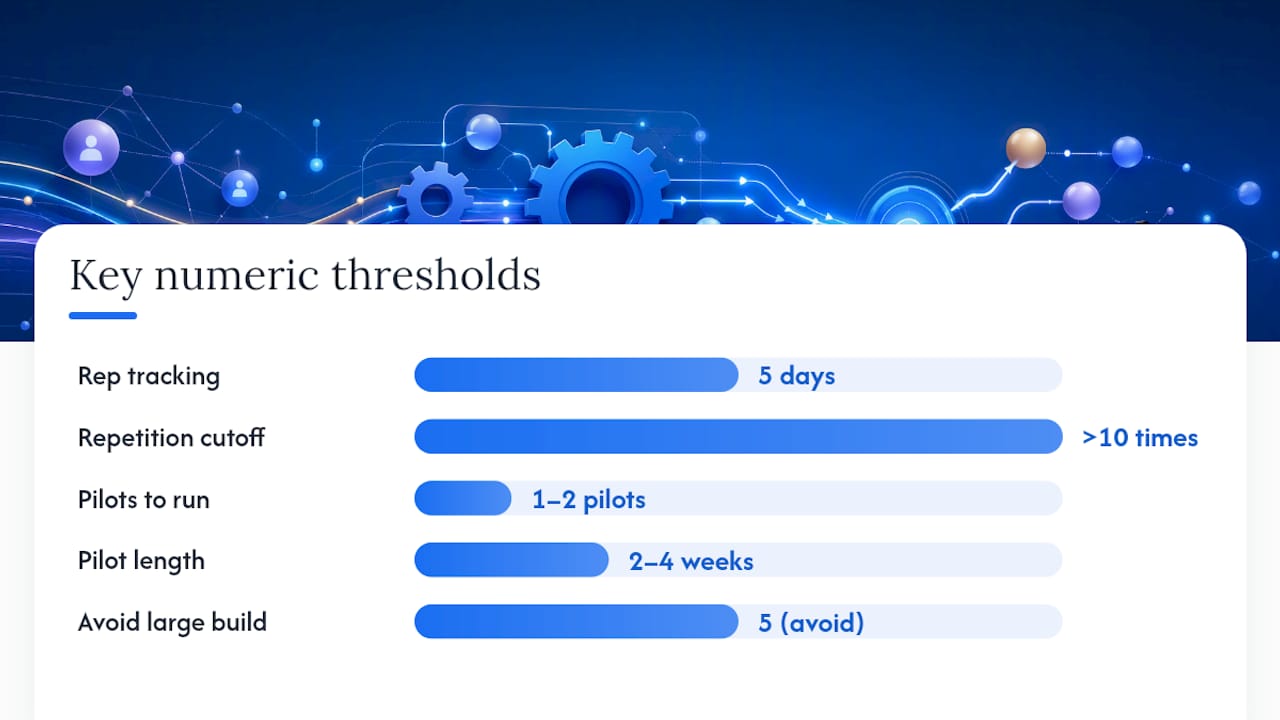
Start by auditing where reps actually lose time, not where automation looks impressive. Ask each rep to track their week for five days and flag anything they do more than ten times that involves copying data, sending a templated message, or waiting on someone else. Those repetitive, high-frequency, low-judgment tasks are your pilot candidates.
Pick one or two, not five. Lindy.ai's research on workflow automation found that smaller pilots are easier to govern and iterate, while large, complex builds tend to fail from brittle integrations and no clear owner.
Design each pilot with a simple template:
- Trigger: the exact event that starts the workflow (form submitted, deal stage changed, email opened)
- Action: what the system does automatically
- Handoff: where a human takes over, and who that person is
- Approval: any step that needs sign-off before it goes external
- Guardrail: the rule that stops or pauses the automation
- Acceptance criteria: the number that tells you it worked
That guardrail step matters more than most teams think. Outreach's guidance on sales automation recommends pausing a sequence the moment a prospect replies or books a meeting, so automation never talks over a live conversation. Skip that rule and you'll eventually send a "just following up" email to someone who already booked a call, which reads as sloppy at best.
Run the pilot for two to four weeks against a baseline you captured before flipping it on, then review weekly with whoever owns the workflow. Document the trigger logic somewhere a new hire could find it, because undocumented automations become fragile the moment the person who built them leaves.
Pro Tip: Before adding AI decisioning to any step, run it manually for two weeks first and log what a human would have chosen. That gives you a baseline to judge whether the AI's calls are actually better, not just faster.
What Should You Look for in Sales Automation Tools?
Build around your CRM, not around whatever standalone tool looks slickest in a demo. A CRM-first architecture gives every connected tool access to full deal context, and that context is what makes AI scoring and forecasting reliable instead of guesswork. Fragmented data across five disconnected apps is the single biggest reason automations break or give bad recommendations, according to MuleSoft's connectivity research.
Prioritize integrations with your calendar, email, conversation intelligence, and document tools, since those are where most manual handoffs happen. When you're evaluating sales engagement platforms, run down this checklist:
- Native automation builder with visible trigger and action logic, not a black box
- AI-based lead scoring you can inspect and adjust
- Event triggers based on buyer behavior, not just time delays
- Cross-app workflows that write back to the CRM automatically
- Built-in analytics on cycle time and conversion, not just activity counts
- Approval steps for anything that touches pricing or external communication
There's a real trade-off between simple rule engines and agentic AI assistants. Rule engines are predictable and easy to audit; you always know why something fired. Agentic tools, the kind Activepieces documents as increasingly common in no-code platforms, can act on nuance a rule engine misses, but they're harder to debug when something goes wrong. Most teams do best running rules for anything compliance-sensitive and reserving AI judgment for lower-stakes drafting and prioritization.
On data hygiene and security: restrict who can edit trigger logic, log every automated action for audit purposes, and review data-sharing permissions any time you connect a new third-party tool to your CRM. A workflow that quietly emails the wrong list because of a permissions error is a bigger problem than the manual work it replaced.
How Do You Measure the Impact of Sales Automation?
Track five numbers before and after any pilot: average time spent on admin per rep per week, lead response time, conversion rate at each stage, average deal cycle length, and pipeline velocity in dollars per day. That last metric, sometimes tracked as a segmented pipeline velocity model, tends to move first and most visibly once follow-ups stop slipping.
Secondary indicators worth watching: CRM field completeness, task completion rate, and reply rate on automated outreach. A workflow that saves time but tanks reply rate isn't actually a win.
MuleSoft's research on connected systems backs a simple principle here: tie automation experiments to revenue signals like cycle time and pipeline velocity, not activity counts like emails sent. Review results weekly during a pilot, then move to a monthly dashboard cadence once a workflow is stable and proven.
What Do Field Playbooks Get Right About Automating Sales?
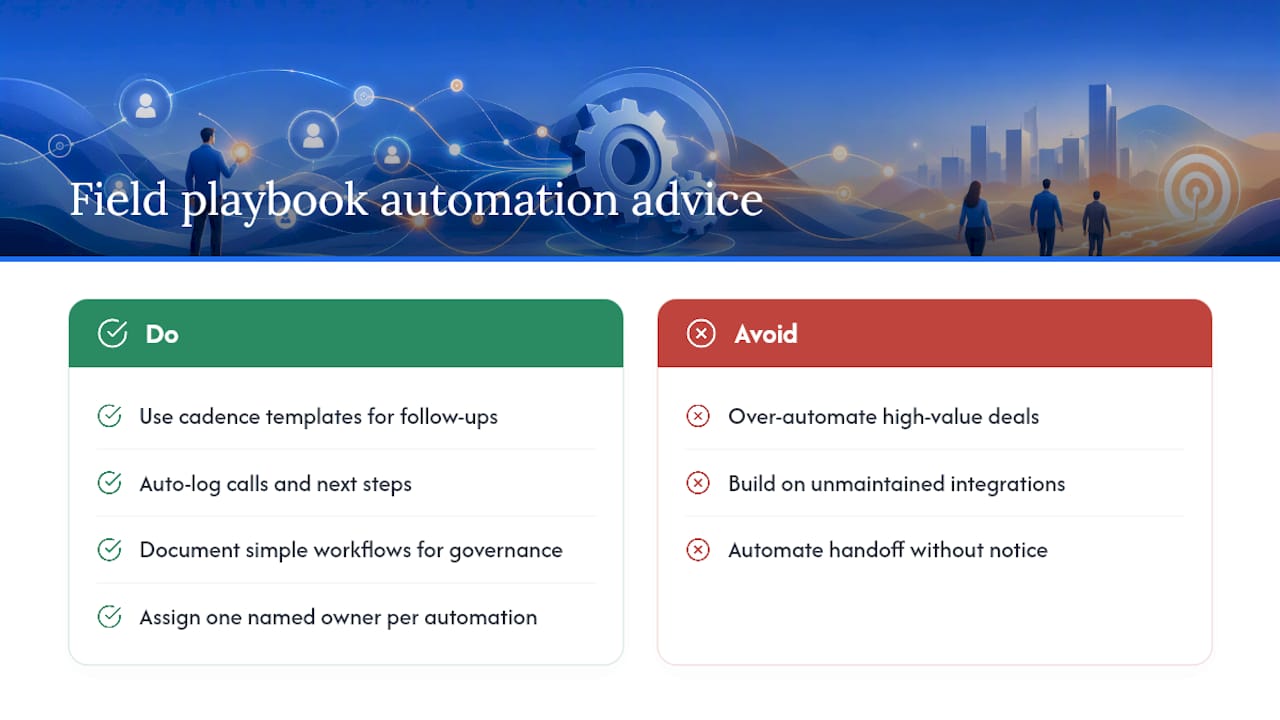
Two pilots consistently deliver the fastest payoff: automated follow-up sequences and CRM logging. Set up follow-ups using proven cadence templates rather than building sequence logic from scratch, and make sure logging automatically captures call notes and next steps the moment a rep hangs up.
The most common mistake is over-automating high-value deals. A six-figure opportunity doesn't need a drip sequence; it needs a rep paying attention. The second mistake is building on integrations nobody maintains, so a field mapping breaks silently and nobody notices for weeks. The third is automating a handoff without telling the person receiving it, which means deals land in someone's queue with zero context.
Governance beats cleverness. A documented, boring workflow that three people understand will outperform a brilliant one only its builder can explain.
Pro Tip: Assign one named owner to every live automation, even a simple one. "The team" owning a workflow means nobody actually does.
What Most Advice Gets Wrong About Sales Automation Workflows
Most guidance treats automation as a volume play: automate more steps, touch more leads, move faster. That's backward. The teams getting real results automate the fewest, highest-friction steps first and leave everything else alone until those prove out.
The conventional advice to "automate your entire funnel" ignores that most funnels break at one or two points, usually follow-up timing and CRM logging, not everywhere at once. Fixing those two well beats a half-built automation touching ten stages badly.
What I'd prioritize first, every time: pick one bottleneck, wire it to your CRM, put a human checkpoint on anything that touches a live prospect, and measure cycle time before you touch anything else. Everything past that, including AI scoring and agentic decisioning, only earns its place once the fundamentals hold up under real deal volume, not a demo.
— Chad
Want Hands-On Help Building Your First Pilot?
Reading a playbook gets you most of the way. Getting a pilot workflow designed, wired to your CRM, and running correctly in a week instead of a quarter usually takes someone who has built these before. Chad Burmeister has spent 25-plus years scaling sales and business development teams at companies like Informatica, RingCentral, and Cisco WebEx, and that field experience is baked into every workshop and consulting engagement he runs.
A typical engagement starts with a rapid audit of where your reps lose the most time, then moves into building one or two priority automations with governance templates already built in, plus hands-on coaching so your team can maintain and extend them without outside help later. If your team wants structured training behind the pilot, the Be Extraordinary curriculum covers the same frameworks used in live workshops. Check speaking and workshop details or explore Be Extraordinary Groups to start a conversation about what a pilot would look like for your team.
Sources
- Zapier — sales automation
- Lindy
- Salesforce — What is a Sales Workflow? Stages, Benefits & Automation
- Outreach — Sales automation
FAQ
What Are Examples of Automated Sales Workflows?
Common examples include lead routing and enrichment, automated follow-up sequences, meeting scheduling, CRM data logging, proposal generation, and post-sale onboarding handoffs. Salesforce lists these as the core automation categories most teams build first.
What Are Some Examples of Sales Automation Beyond Email?
Beyond email sequences, sales automation covers lead scoring, deal-stage triggered task creation, automatic call and note logging, contract and proposal routing for approval, and handoff notifications to customer success once a deal closes. Each removes a manual step that otherwise falls on a rep or ops person.
How Do You Automate Your Sales Process Step by Step?
Audit where reps lose the most time, pick one or two high-frequency, low-judgment tasks, and build a workflow with a clear trigger, action, and human checkpoint. Pilot it for two to four weeks against a baseline, then expand once you've measured a real improvement in cycle time or response speed.
Can AI Tools Like ChatGPT Automate Sales Tasks?
AI tools can draft follow-up emails, summarize call notes, and score leads based on CRM data, but they work best feeding into a workflow rather than running one unsupervised. Zapier's analysis notes that agentic AI can act on real-time context like email replies, though human review still matters for anything touching pricing or a high-value relationship.