LinkedIn AI prospecting works by pairing faster, smarter targeting with AI-drafted personalization and staged automation, so a rep can build qualified pipeline without burning through connection requests or getting flagged. The fastest way to start: define your ideal customer profile, pull a list with Sales Navigator filters, generate AI invite drafts, review every one by hand, then send in small, staged batches.
TL;DR:
- Most teams need discovery and enrichment tools first if they struggle with building accurate, current prospect lists on LinkedIn.
- Personalization engines deliver better engagement when they reference specific signals like recent posts or job changes, outperforming generic messages.
- Maintaining account safety relies on gradually warming up accounts, varying message structures, and monitoring acceptance and restriction signals closely.
- Testing success depends on tracking acceptance, reply, booking, and conversion rates, with acceptance rate as the primary indicator of targeting and messaging quality.
- A 60 to 90-day pilot involving small teams and clear roles helps validate AI prospecting effectiveness before full-scale rollout.
Table of Contents
- What Is LinkedIn AI Prospecting, Exactly?
- Which AI Tools Actually Help With Prospecting?
- How Do You Keep a LinkedIn Account Safe While Automating?
- How Do You Build an AI-Powered Outreach Sequence?
- Which Metrics Actually Tell You the Campaign Is Working?
- How Should You Pilot AI Prospecting Before Rolling It Out?
- Why Quality Beats Volume in AI-Driven Prospecting
- Sources
- FAQ
What Is LinkedIn AI Prospecting, Exactly?
LinkedIn AI prospecting is the practice of using artificial intelligence to find, qualify, and reach out to prospects on LinkedIn faster than manual research allows. It's not one tool or one feature. It's a stack: discovery software that surfaces the right people, language models that draft the first message, and automation layers that pace the outreach so it looks and feels human.
The distinction matters because most sales professionals hear "AI prospecting" and think it means a bot that sends 500 connection requests a day. That's automation, not prospecting. Real AI prospecting uses machine intelligence to make each touch more relevant, not just more frequent.
Discovery gets faster and more accurate
AI-powered search inside tools like LinkedIn Sales Navigator can parse job changes, hiring signals, and content activity to build a list that actually matches your buyer profile, instead of a static title and industry filter. LinkedIn's own AI features are built specifically to help sellers with targeting, personalization, and timing, which is a different job than simply scraping a search result page.
Personalization stops being a guessing game
A rep manually checking 40 profiles for a personalization hook will burn an entire morning. AI can scan a prospect's recent post, a promotion, or a shared connection and draft a note that references it in seconds, showing why personalized content matters to boost engagement and results. LinkedIn's guidance on AI-assisted prospecting points to this exact workflow: analyze what's working, personalize based on real signals, and automate the enrichment that used to eat up research time.
Prioritization replaces spray-and-pray
Intent signals and lead scoring tell you who to call first. Instead of working a list top to bottom, AI models rank prospects by engagement likelihood, recent activity, or account fit, so your best reps spend time on the accounts most likely to convert.
Here's where the time actually gets saved:
- Research that took 15 minutes per prospect now takes under a minute with enrichment tools.
- First-draft messaging that used to require a blank page now starts from an AI draft a human edits.
- List building that took a full day of manual searching now runs on saved, AI-refined filters.
- Qualification, tone, and judgment calls stay with the human, where they belong.
That last point is the one teams get wrong most often. AI should shrink the time spent on research and drafting, freeing reps to spend more time actually talking to qualified people, not less time thinking about who those people are.
Which AI Tools Actually Help With Prospecting?
Skip the vendor shootout. What matters is understanding the four capability categories and matching them to what your team actually needs, because most teams overbuy automation and underbuy the tools that make outreach smarter.
Discovery and enrichment engines. These pull firmographic data, recent job changes, funding events, and contact details into one record. The output you want is a clean, current list with enough context to personalize a first message without opening ten browser tabs.
Personalization engines. This is where language models draft invites, follow-ups, and reply suggestions based on a prospect's profile and activity. The best versions of this reference something specific, a recent post, a new role, a shared group, because outreach that mentions a real signal consistently outperforms templated messages at scale. A note that says "Loved your take on pipeline forecasting last week" beats "I'd love to connect" every time.
Automation safety layers. Rate limiting, warm-up scheduling, and human-in-the-loop review sit here. There's a real trade-off between browser extensions and native, API-based tools: extensions are cheaper and faster to set up, but they run a higher detection risk because they mimic browser behavior instead of working through approved channels.
Pipeline integrations. Once a prospect accepts or replies, that event needs to land in your CRM automatically, tagged with the campaign, the message variant, and the next action. Without this, your best data disappears into someone's inbox.
Pro Tip: Before you subscribe to anything, map your current bottleneck. If reps are drowning in research, buy enrichment. If your messages sound robotic, buy a personalization engine. Buying automation to fix a personalization problem just gets you flagged faster.
Here's how the categories break down by what they actually solve:
- Discovery and enrichment: solves "I don't know who to contact."
- Personalization engines: solve "My messages sound generic."
- Safety layers: solve "I need to scale without risking the account."
- CRM integrations: solve "Good replies are falling through the cracks."
Most teams need pieces of all four, but rarely need them at the same time. Start with whichever bottleneck is actually costing you meetings.
How Do You Keep a LinkedIn Account Safe While Automating?
LinkedIn's detection systems look for patterns that don't look human: identical message templates sent in bulk, connection requests fired at inhuman speed, or a brand-new account suddenly hitting daily limits. Behavioral mimicry, meaning your outreach cadence and message variation look like a person working through a list, is the single biggest factor in staying under the radar. Vendor guidance on safe automation consistently points to warm-up schedules and message variation as the two levers that matter most.
Here's a defensible approach for scaling outreach without triggering restrictions:
- Warm up new or dormant accounts slowly. Start with a low number of connection requests a day in the first week and increase gradually over several weeks, and never jump straight to your target volume on a fresh account.
- Watch your acceptance rate as the leading health signal. A healthy campaign typically holds an acceptance rate that is comfortably above a low threshold. If it drops sharply, your targeting or your message is the problem, not your volume.
- Vary message structure across batches, not just the first line. Two hundred notes with the same opening sentence and a swapped name is a pattern LinkedIn's systems can catch.
- Space sends throughout the day instead of firing a batch in one sitting. Real humans don't send 50 invites in four minutes.
- Review every batch for structural similarity before it goes out. If an AI tool generated all your drafts from one prompt template, check that the sentence structure actually varies, not just the personalization token.
Watch for these warning signs that something's wrong: a sudden CAPTCHA challenge, a security checkpoint on login, or an acceptance rate that drops by half week over week. Any of those means pause the campaign, drop your volume back to warm-up levels, and audit your message variation before resuming.
Pro Tip: If your account gets a temporary restriction, don't immediately resume at your old volume. Treat it like a fresh warm-up: low volume, high variation, for at least two weeks before scaling back up.
How Do You Build an AI-Powered Outreach Sequence?
Here's the workflow, start to finish, that you can run this week without needing new headcount or a big tool budget.
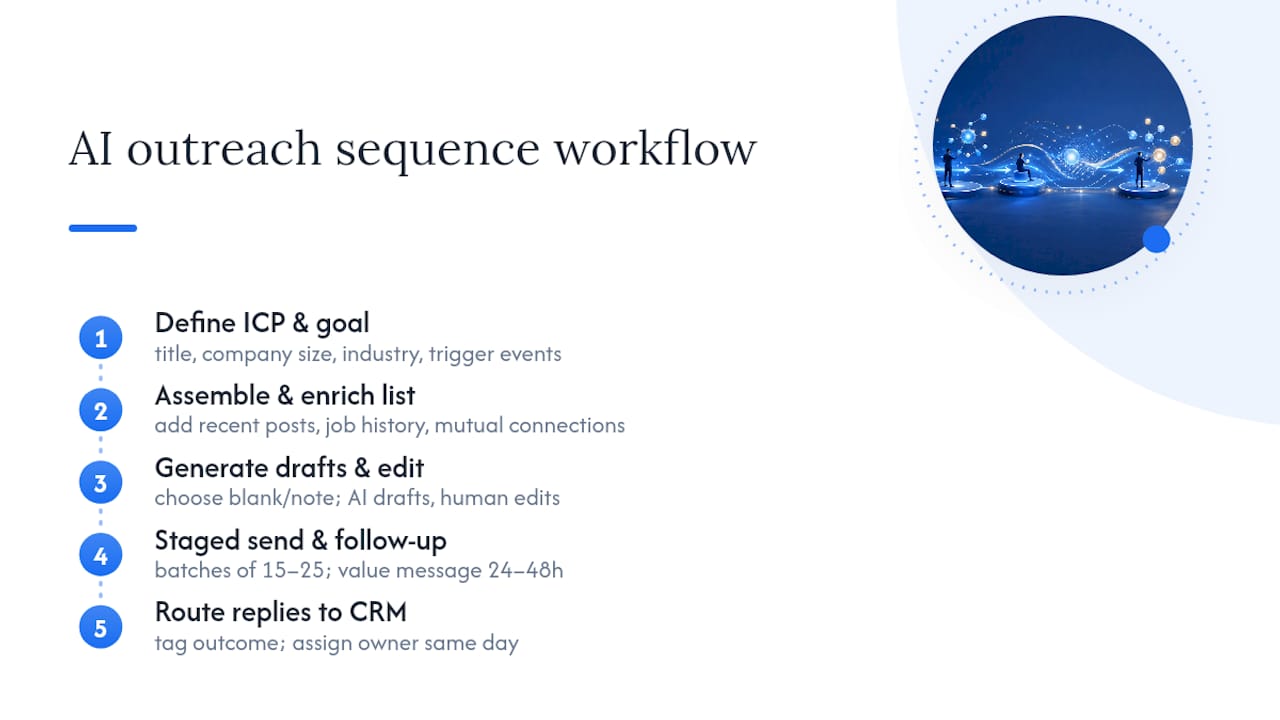
Step 1: Define your ICP and campaign goal before touching any tool. Get specific: title range, company size, industry, and one or two trigger events (funding round, new hire, product launch) that signal timing. Build this into your Sales Navigator filters so the list you pull actually matches the account you'd sign, not just a title match.
Step 2: Assemble and enrich your prospect list. Export or sync your filtered list into an enrichment tool that pulls recent posts, job history, and mutual connections. This is the raw material your personalization engine needs. A list of names with no context produces generic drafts no matter how good the AI model is.
Step 3: Decide between blank and note invites, then generate drafts. A blank connection request works fine for warm or mutual-connection prospects. Cold outreach into a new market almost always performs better with a short, personalized note referencing something specific from step two. Generate the drafts with AI, then have a human read and edit every single one before it sends. This is the step teams skip when they're in a hurry, and it's the step that determines whether your acceptance rate holds up.
Step 4: Send in stages with warm-up pacing, then follow up after acceptance. Don't queue your entire list at once. Send in batches of 15 to 25, spaced through the day, and build a follow-up sequence that triggers only after acceptance, not before. A good sequence looks like: acceptance, then a value-add message within 24 to 48 hours, then a soft ask for a call if there's engagement, then a final follow-up if there's silence.
Step 5: Route every reply to your CRM and assign ownership immediately. Tag each outcome (interested, not now, no fit) and assign a follow-up owner the same day a reply comes in. Replies that sit for three days lose most of their momentum. If your CRM integration is doing its job, this step should be close to automatic.
Teams that build proprietary sequences around this structure often adapt it from proven frameworks. Chadburmeister's LinkedIn outreach strategy playbook walks through the message-sequencing piece in more depth if you want templates to start from.
Which Metrics Actually Tell You the Campaign Is Working?
Four numbers matter more than the rest: acceptance rate, reply rate, meeting booked rate, and pipeline conversion. Everything else is noise until those four are healthy.
- Acceptance rate is your leading indicator. It tells you if your targeting and your note are landing before you've spent any real selling time.
- Reply rate tells you if your follow-up sequence is actually valuable once someone's in your network.
- Meeting booked rate measures whether your qualification and ask are working, not just your opener.
- Pipeline conversion is the number that eventually justifies the whole effort to leadership.
A dropping acceptance rate almost always means one of two things: your targeting has drifted off your ICP, or your note has gotten stale from overuse. Rising CAPTCHA challenges or sudden restriction notices are the platform telling you volume has outrun quality, full stop.
Run A/B tests on one variable at a time. Test the opening hook against a control group, test one segment (say, VP-level versus director-level) against another, and test cadence timing (immediate follow-up versus 48-hour delay) separately. Some vendor case studies report meaningfully higher reply and acceptance benchmarks when AI-driven personalization and intent signals are combined, though these vendor-reported ranges vary widely and shouldn't be treated as a universal number for your industry or list.
At minimum, log this per prospect: the message variant sent, the send date, acceptance status, reply status, and meeting outcome. Without that record, you're guessing at what to improve next quarter instead of knowing.
How Should You Pilot AI Prospecting Before Rolling It Out?
Run a 60 to 90 day pilot before you hand AI prospecting to your whole team. Small, measurable, and reversible beats a full rollout that breaks three accounts in week two.
Scope it small on purpose. Two to three reps, one clearly defined ICP segment, and a 60 to 90 day window is enough to get a real read on acceptance and reply quality without risking your whole outbound motion.
Assign three roles before you start:
- A message approver who reviews AI drafts before they send, at least for the first several weeks.
- An ICP owner who keeps the targeting filters honest and flags drift.
- A CRM owner who makes sure replies and outcomes are logged consistently, not just when someone remembers.
Set your escalation triggers up front, not after something breaks: pause the pilot if acceptance rate drops below your baseline for two consecutive weeks, or if any account gets a platform warning. Scale it only when acceptance, reply, and meeting rates hold steady across two full sequence cycles.
The pilot design should treat acceptance rate as the leading indicator worth optimizing first, before you ever touch volume. Chadburmeister's 90-day pilot framework walks through sample sizing and review gates in more detail, and The AI for Sales Podcast covers how other sales leaders have run similar rollouts inside their own teams.
Why Quality Beats Volume in AI-Driven Prospecting
Most teams treat AI prospecting as a volume lever. That's backwards. The reps who get real pipeline out of this treat acceptance and reply quality as the metric to fix first, then scale volume only once those numbers hold steady across a few weeks.
Weekly funnel reviews matter more than any tool purchase. A team that looks at acceptance and reply data every week catches drift in days, not months. And there are still moments, complex accounts, senior titles, high-stakes deals, where a human-drafted note beats anything AI generates. Know which moments those are before you automate them away.
— Chad
Sources
For platform-specific detail, see LinkedIn's AI for sales overview and its guidance on AI tools for prospecting. For structured training, LinkedIn Learning's Leveraging AI for Sales Prospecting course covers lead scoring and personalization in depth. For proprietary templates, see Chadburmeister's B2B lead generation playbook.
Want a structured breakdown of building your own pilot? Chad Burmeister's site covers consulting engagements and speaking topics built around exactly this framework, and his books go deeper into the AI-for-sales strategy behind it.
FAQ
What Is the Best AI Tool for LinkedIn Prospecting?
There's no single best tool because the right one depends on your bottleneck: discovery and enrichment tools solve list-building, personalization engines solve generic messaging, and safety layers solve scaling risk. Match the tool category to the problem you actually have before comparing vendors.
What Is the 4-1-1 Rule on LinkedIn?
The 4-1-1 rule is a content-sharing guideline suggesting that for every one piece of promotional content you post, you should share four pieces of others' content and one piece of your own non-promotional content. It's a social-selling ratio, not a rule specific to AI prospecting, but it reinforces why value-first outreach outperforms pitch-first messaging.
What Are the 5 P's of Prospecting?
Definitions of the "5 P's" vary by sales methodology, and there's no single industry-standard version tied specifically to LinkedIn or AI prospecting. Rather than force a definition, focus on the fundamentals this article covers: clear targeting, personalization, prioritization, pacing, and pipeline follow-through.
What Is LinkedIn Prospecting?
LinkedIn prospecting is the process of identifying, researching, and reaching out to potential buyers on LinkedIn to build sales pipeline. AI-powered prospecting adds machine-driven targeting, message drafting, and lead scoring on top of that core process to make it faster and more consistent.
How Do I Know If My AI Prospecting Campaign Is Working?
Track acceptance rate, reply rate, meeting booked rate, and pipeline conversion together rather than any single number in isolation. A healthy campaign holds acceptance at a comfortable level; a sharp drop in that number, paired with rising CAPTCHA challenges, signals it's time to pause and adjust targeting or messaging before scaling further.