Yes, AI email personalization works, but only when it runs on clean data and passes through a human before it hits send. Skip either guardrail and you get generic mail-merge dressed up as personalization, or worse, a message that reads like your prospect is being watched. The fastest path to results looks like this: pick one high-quality data signal you already trust, wire it into a single template, and route every draft through a reviewer before it leaves the building.
Start here:
- Audit your first-party data first. Before touching any AI tool, find the one or two fields in your CRM you'd actually bet money on: job change date, recent funding event, or a specific page visit. Ignore the rest until the pilot proves out.
- Build in human-in-the-loop review. No AI draft goes out unedited. A person checks tone, verifies the personalization detail is actually true, and confirms nothing sensitive slipped in.
- Run a consent and privacy check. Know which data sources you're using and whether the prospect would recognize how you got that detail.
The stakes are real: more than 347 billion emails move through inboxes every day, and Gartner projects more than 80% of enterprises will have adopted generative AI applications by 2026. Personalization at scale isn't optional anymore. It's table stakes for getting read at all.
Key Takeaways
AI email personalization increases reply rates only when paired with clean first-party data, a human-in-the-loop review step, and measurement against a real control group.
| Point | Details |
|---|---|
| Start with one signal | Pick a single trusted personalization signal per segment before adding complexity. |
| Keep humans in review | Every AI-drafted email needs a fact-check and brand-voice pass before it sends. |
| Measure qualified replies | Reply-to-meeting conversion matters more than open or click rates. |
| Match tool to data maturity | Lightweight writing assistants suit small teams; CDP-native platforms suit complex data stacks. |
| Govern the prompt library | Version templates, assign an owner, and keep a rollback plan ready. |
Table of Contents
- How Does AI Email Personalization Actually Work?
- Best Practices for Personalizing Without Being Creepy
- How Do You Implement AI Email Personalization Step by Step?
- What Metrics Actually Prove AI Personalization Is Working?
- Which Category of AI Email Tool Fits Your Team?
- What I've Learned Scaling SDR Teams With AI Personalization
- Ready to Build a Governed AI Personalization Program?
- Sources
- FAQ
How Does AI Email Personalization Actually Work?
Strip away the marketing language and AI email personalization is three things stitched together: a data pipeline, a language model, and a set of rules for when to generate what. Understanding each piece tells you where things break.
Data inputs come from four buckets. CRM fields (job title, industry, deal stage) form the baseline. Engagement events (email opens, website visits, content downloads) add behavioral signal. Public profile data, scraped from LinkedIn or company sites, fills in context the CRM doesn't have. Intent signals, like a company suddenly hiring for a role your product supports, tell you when to reach out, not just what to say. The tool is only as good as the weakest bucket you feed it. Garbage CRM data produces garbage personalization no matter how sophisticated the model behind it.
Model outputs range from a single line to an entire draft. Some tools just generate a personalized subject line or opening sentence and leave the rest of the email as a static template. Others build dynamic blocks, inserting a paragraph about a specific pain point based on the recipient's industry. The most advanced systems, including what Mailtrap describes as full-email generation, draft the entire message from a brief, pulling company news, role context, and even likely objections into a coherent first-touch email.
Three workflow patterns dominate outbound today:
- On-send generation creates the personalized copy the moment a rep hits send, pulling the freshest data available at that instant.
- Batch enrichment processes a list overnight, attaching personalized fields to thousands of contacts before a rep ever opens the sequence.
- Agentic journeys go further, building entire multi-touch, account-specific campaigns from one prompt and adjusting follow-ups based on how the prospect responds. Mailtrap and other practitioner sources describe these agentic workflows requiring real governance because they touch a lot of prospect data with limited human checkpoints.
Each pattern trades speed for oversight. On-send generation gives a rep control but slows down high-volume sequences. Batch enrichment scales fast but can go stale if the underlying data shifts between the enrichment run and the actual send. Agentic journeys are the most powerful and the easiest to get wrong.
Four failure modes show up again and again. Hallucination tops the list: the model invents a detail, like a funding round that never happened, because it's pattern-matching rather than verifying. Stale data is the second, quieter problem. A tool references someone's "recent promotion" that happened eight months ago, and the prospect notices immediately. Over-personalization is the third: cramming five data points into one email makes it read like a dossier instead of a message. Prompt drift, the fourth failure mode, happens when a template that worked well in January starts producing off-brand copy by March because nobody's tracking what changed.

Pro Tip: Run a monthly "freshness audit" on any data field you use for personalization. If the source updates less often than every 60 days, flag it as high-risk for stale references and either refresh it manually or drop it from your template.
The mechanics matter because every one of these failure modes is preventable with process, not more AI. That's where the real work happens.
Best Practices for Personalizing Without Being Creepy
The line between "this rep clearly did their homework" and "this company is watching me too closely" is thinner than most teams think, and AI makes it easy to cross without noticing.
Use first-party signals, and use fewer than you think you need. A prospect who downloaded your pricing page three days ago is a strong, legitimate signal. Scraping someone's personal Instagram for a hobby to reference in a cold email is not, even though a tool can technically do it. Twilio's guidance on personalized email marketing is blunt about this: personalization needs to match lifecycle context, not just prove you can find information. One relevant detail, tied to something the prospect actually did or a real business event, outperforms three details stacked together.
Pick a single core signal per segment and build the template around it. A "recently promoted to VP" trigger deserves a different opener than a "visited the integrations page twice" trigger. Trying to reference both in one email usually reads as clumsy, not thorough.
Keep a human in the loop, every time, no exceptions for volume. This is the rule most teams break first when they scale. It's easy to trust the model on message one hundred after it nailed messages one through fifty. But hallucination risk doesn't decrease with volume. It compounds, because nobody's checking as closely. Mailtrap's guidance on production email programs treats human-in-the-loop review as the mechanism that catches hallucinations before they reach a prospect's inbox, not an optional quality gate.
A workable review process looks like this:
- Fact-check every inserted detail against the source system before the email leaves the queue.
- Read for brand voice. AI-generated copy tends to drift toward generic enthusiasm; a human editor pulls it back to how your team actually talks.
- Flag anything that references personal, non-business information for removal, even if it's technically accurate.
- Sample-audit at scale. Once volume gets too high for line-by-line review, pull a random 10% sample daily and check it against the same standard.
Balance personalization with deliverability, because a "personalized" email that lands in spam helps nobody. Sending volume, sender reputation, and list hygiene matter as much as the copy itself. Throttle sending speed so your domain doesn't trip spam filters. Clean your list regularly, removing bounces and unengaged contacts, because a bloated list drags down deliverability for every message you send, personalized or not. Stagger send times across a campaign rather than blasting everyone at 9:00 AM sharp, which is itself a pattern spam filters have learned to flag.
Document your data sources and be ready to explain them. If a prospect asked "how did you know that?" would your answer sound reasonable, or would it sound like surveillance? That's a fair test for any personalization element before it ships. Avoid sensitive categories entirely: health status, family situations, financial distress, or anything scraped from a personal social account rather than a professional one. Under GDPR in the EU and the CCPA in California, using personal data for marketing outreach without a clear basis or without honoring opt-out requests carries real legal exposure, not just a reputational risk. Keep a simple record of which data source fed which personalization field, so you can answer a compliance question or a prospect's complaint without scrambling.
Pro Tip: Before any personalized campaign goes live, ask one reviewer to read five sample emails cold, with no context on how they were generated. If any of the five make them uncomfortable, that's your signal to dial back the personalization, not push forward.
How Do You Implement AI Email Personalization Step by Step?
Rolling out AI personalization without a sequence invites exactly the failure modes covered above. A staged rollout, tested on a small group before it touches your full pipeline, catches problems while they're still cheap to fix.
- Audit and unify your identity data. Before selecting any tool, find out how many versions of "the same contact" exist across your CRM and contact database. Duplicate or fragmented records are the single most common cause of personalization that references outdated job titles or wrong companies.
- Select segments and one signal per segment. Resist the urge to personalize on everything at once. Pick two or three segments (recent trial signups, post-demo no-shows, target accounts that just raised funding) and assign exactly one core signal to each.
- Build prompt templates with explicit rules, not open-ended instructions. A template that says "write something personal about their company" invites hallucination. A template that says "reference the specific event in the {{trigger_field}}, keep it to one sentence, and never invent details not present in the data" constrains the model toward accuracy.
- Add a mandatory edit pass before anything sends. This is the human-in-the-loop checkpoint from the best-practices section, now built into the actual workflow rather than treated as an afterthought.
- Run a controlled pilot before scaling to your full list. Split a single segment into a control group getting your standard template and a test group getting the AI-personalized version. Measure qualified reply rate, not just opens, over a fixed window before deciding whether to expand.
A workable minimum pilot design: pick one persona and one trigger event, like a demo no-show, randomize recipients into control and AI-personalized groups, and track qualified replies over four weeks with enough recipients in each group to make the result meaningful. Scale only once the lift is clear and consistent, not after one good week.
Keep these operational details in mind as you move through the sequence:
- Store every prompt template in a version-controlled repository so you can trace which version produced which output and roll back a template that starts underperforming.
- Assign a single owner for the prompt library. Without one, templates drift as different reps tweak wording independently.
- Log edits made during human review. If reviewers keep fixing the same kind of error, that's a signal the prompt itself needs revision, not just the output.
- Connect the pilot's results back to your CRM-first sales workflow so the data feeding your personalization stays synced with what your reps see day to day.
The teams that get this right treat the pilot as a real experiment, not a soft launch. That means writing down the hypothesis (which signal, which segment, expected lift) before you send a single email, so you're not tempted to rationalize a mediocre result after the fact.
What Metrics Actually Prove AI Personalization Is Working?
Reply rate to a qualified meeting is the metric that matters most, and it's the one most teams measure worst. Open rate and click-through rate are useful supporting signals, but they're vanity metrics if a personalized email gets opened at a higher rate yet produces the same number of actual conversations as your generic template.
Track these in order of importance:
- Qualified reply rate. Not just any reply, a response that indicates real interest or moves toward a booked meeting. This is the number that should justify continued investment.
- Open rate, as a secondary signal. Personalized subject lines have a documented history of moving this number. Experian's research, cited by Twilio, found personalized subject lines produced a 26% higher unique open rate compared to generic ones in the studies it examined.
- Click-through rate, when your email includes a link, as a check on whether the personalized angle actually motivated action.
- Deliverability rate. If personalization pushes you toward higher volume or more dynamic content, monitor bounce and spam-complaint rates closely. A clever email that never reaches the inbox is worthless.
- False personalization rate. Track how often a human reviewer catches an inaccurate or awkward personalized detail before send. Rising numbers here mean your data pipeline needs attention, not your prompts.
Test design matters more than the tool you pick. A/B testing with true random assignment, not "send AI version to whoever responds first," is the only way to isolate the effect of personalization from confounding factors like time of day or list quality. A holdout group that receives your standard template throughout the test period gives you a clean baseline to measure lift against, rather than comparing this month's AI campaign to last quarter's generic one, when a dozen other variables also changed.
Common measurement traps show up constantly. Small sample sizes produce results that look dramatic and mean nothing. A jump from two replies to five sounds like 150% lift; it's also within the range of random noise for a list that size. Non-random assignment, like giving your best sales rep the AI-personalized list because they're more receptive to new tools, contaminates the result before you've sent a single email. Attribution leakage happens when a prospect who got a personalized email also received a LinkedIn touch or a phone call in the same window, so the reply gets credited to the wrong channel.
Contextualize any industry benchmark against your own baseline rather than chasing an absolute number. A 26% open-rate lift from personalized subject lines is a real, useful data point, but if your current open rate is unusually high or low for reasons specific to your list, the same lift won't translate the same way. Measure your own before-and-after, and treat published benchmarks as a sanity check, not a target.
Which Category of AI Email Tool Fits Your Team?
The market sorts into a handful of categories, and matching your team's structure to the right one saves months of wasted implementation.
AI writing assistants sit closest to the rep. They generate a subject line, an opening paragraph, or a short personalized block, but leave sequencing, sending, and tracking to whatever platform the rep already uses. This category fits small SDR teams that want a lightweight lift without ripping out existing tools. The tradeoff is manual work stitching the AI output into the sending platform.
ESP-integrated personalization builds generative capability directly into the email service provider, so subject lines, dynamic content blocks, and send-time optimization happen inside the same tool that already manages your list and deliverability. This fits teams that have already standardized on one sending platform and want personalization without adding a new vendor to the stack. The integration work is lighter, but you're limited to whatever data the ESP has direct access to.
CDP-native platforms keep customer data and email execution in the same system, which removes the sync lag between your data warehouse and your sending tool. Treasure AI's approach to CDP-native email marketing illustrates the core advantage: personalization draws on a live, unified customer profile rather than a stale export, which both improves freshness and reduces how much personal data gets copied across systems. That second point matters for compliance as much as performance, since fewer copies of PII sitting in disconnected tools means fewer places a breach or an access request has to account for. This category fits organizations with real data infrastructure already in place and a marketing team ready to operate at that level of complexity.
Sequence and engagement platforms layer AI personalization on top of existing multi-touch outbound cadences, generating variation across touchpoints rather than just the first email. These fit teams already running structured sales engagement platforms who want to add generative capability to an existing motion rather than adopt a new category of tool.
Matching category to team size is mostly about data maturity, not headcount. A five-person SDR team with a clean CRM and one clear intent signal does better with a lightweight writing assistant or ESP-integrated tool. An enterprise marketing org with a CDP, multiple data sources, and compliance requirements across regions gets more value from a CDP-native platform, because the governance benefits scale with the complexity they're already managing.
Before signing anything, check these:
- Integration depth. Confirm the tool reads and writes to your CRM in real time, not on a delayed batch sync that reintroduces the stale-data problem.
- Data residency and security certifications. Ask where prospect data is processed and stored, particularly if you operate under GDPR obligations for any EU-based contacts.
- Pricing structure. Per-seat pricing punishes growing teams; usage-based pricing can spike unpredictably during a big outbound push. Know which model you're signing up for.
- Contract lock-in. Watch for minimum-term contracts that outlast your pilot period. A 90-day pilot commitment inside a 12-month contract isn't really a pilot.
None of these categories is universally "best." The right one is whichever matches the data infrastructure you already have and the governance capacity you're actually willing to staff.
What I've Learned Scaling SDR Teams With AI Personalization
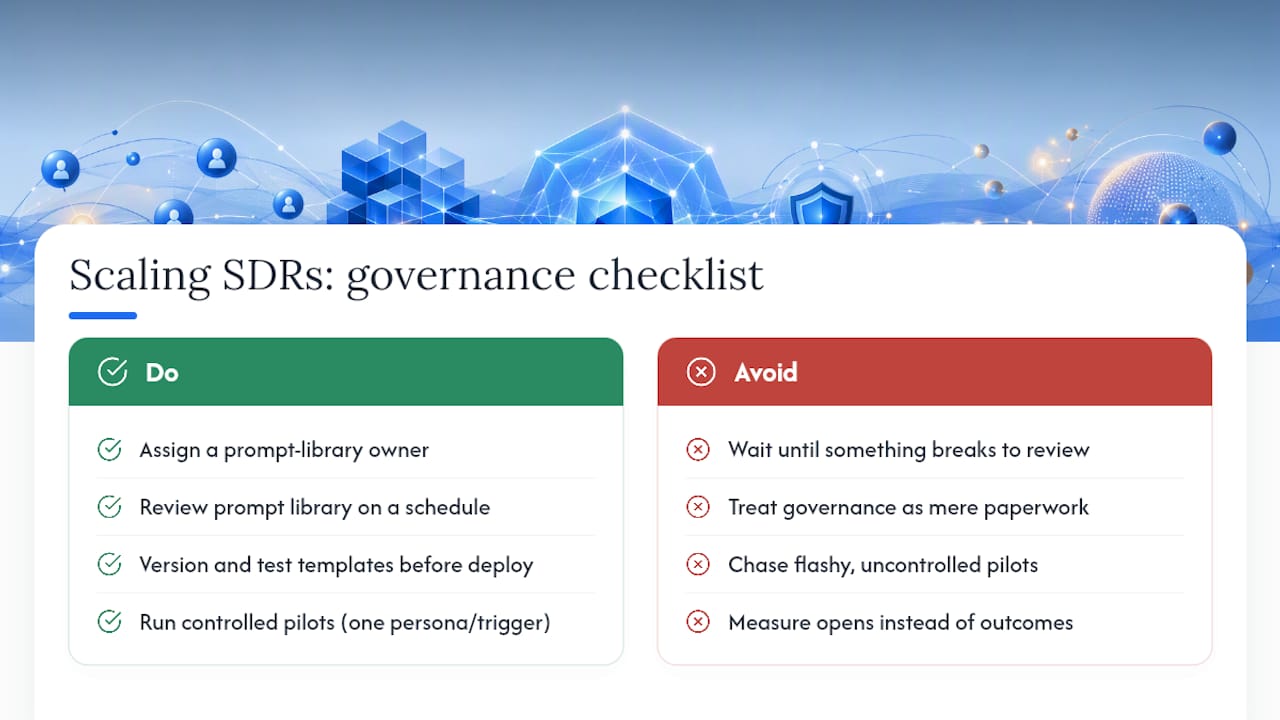
Enterprise SDR teams that get AI personalization right almost always have the same unglamorous habit: someone owns the prompt library, and that person reviews it on a schedule, not just when something breaks. I've watched teams treat their prompt templates the same way they'd treat a piece of production code, versioned, tested before deployment, with a clear rollback plan if a new template underperforms the old one.
The pilot that actually convinces skeptical leadership is never the flashiest one. It's the boring, well-controlled test: one persona, one trigger, a real control group, measured over a few weeks against qualified replies rather than opens. Leadership doesn't get excited about a 26% jump in open rate. They get convinced by a clear, repeatable lift in booked meetings against a clean baseline.
The teams that scale AI personalization successfully treat governance as the product, not the paperwork around the product. Data ownership, review cadence, and a rollback plan aren't compliance overhead. They're the reason the tool still works reliably six months in, instead of quietly degrading while everyone's attention has moved elsewhere.
I've written more on building this kind of AI sales strategy for leaders who need to justify the investment internally, and the deeper mechanics show up across the AI for Sales books and conversations on The AI for Sales Podcast, where practitioners share what actually broke before it worked.
Ready to Build a Governed AI Personalization Program?
Most teams don't fail at AI email personalization because they picked the wrong tool. They fail because nobody owns the governance: the data audit, the review cadence, the rollback plan when a template starts underperforming. That's the gap Chad Burmeister works with sales leaders, CROs, and founders to close, bringing 25-plus years of building SDR and BDR functions at companies like Informatica, RingCentral, and Cisco-WebEx into the specific problem of scaling outbound without losing quality control.
If your team is past the "should we try this" stage and into "how do we run this safely at scale," Chad Burmeister's consulting and leadership work is built for that exact transition. For teams that want to train reps on the underlying framework before bringing in outside help, the Be Extraordinary curriculum covers the same governance principles in a format built for internal rollout.
Sources
- Gartner press release (enterprise generative AI adoption)
- Twilio: 6 tips and examples for personalized email marketing
- Mailtrap: AI email personalization — examples, benefits, best practices
- Statista: Daily number of emails worldwide
FAQ
Does AI email personalization actually improve reply rates, or just open rates? It can improve both, but reply rate is the metric that matters for outbound. Personalized subject lines have shown real lift in open rates in past research, but a genuine increase in qualified replies requires accurate, relevant personalization, not just a name-drop trick that gets the email opened.
What data should I avoid using for AI email personalization? Avoid anything scraped from personal, non-professional sources, health or financial details, or information a prospect would find surveillance-like if they knew how you got it. Stick to first-party CRM data, engagement events, and public professional information tied to a clear business context.
How do GDPR and CCPA affect AI-driven email personalization? Both regulations require a lawful basis for using personal data in marketing and require honoring opt-out and deletion requests. Document which data sources feed each personalization field, so you can respond to a compliance request or complaint without scrambling to reconstruct where a detail came from.
Can small SDR teams use AI personalization without a big tech stack? Yes. A lightweight AI writing assistant layered on top of an existing CRM and sending tool works fine for smaller teams, as long as the human review step stays in place. The heavier CDP-native platforms are built for organizations already managing complex, multi-source customer data.
What's the biggest mistake teams make when scaling AI personalization? Removing the human review step once volume gets high. Hallucination and stale-data risk don't shrink as volume grows, they compound, because fewer people are checking each individual email closely.